 admin
admin
Communication with a client on WhatsApp: how to always be in touch
WhatsApp Business API is a convenient and simple way to communicate with clients, allowing you to be closer, clearer and faster. There are plenty of obvious benefits for both customers and business. The company receives additional information about the consumers of its goods and services, the opportunity to communicate with them on important issues, maintaining their loyalty to the brand. The client – a prompt response to his requests, solutions to his problems and the latest information about promotions and special conditions for subscribers.
You don't need a phone to communicate with a customer in the WhatsApp Business API. In this case, your client will see exactly the same account as if you wrote to him through a mobile phone number. That is, when communicating with a client via the WhatsApp Business API, the window looks familiar to him and will not cause even the slightest discomfort. It’s just like talking to your best friend.
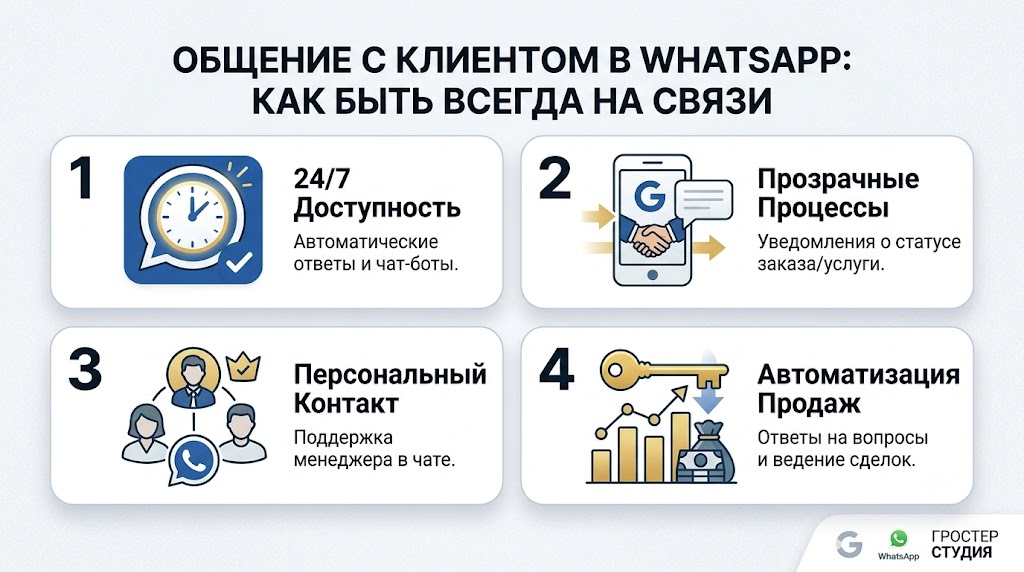
There are differences, because you are a business account. And in this case, when communicating with a client via the WhatsApp Business API, you have undoubted advantages. For example, you can receive official verification of your account and with it a green check mark that will appear next to your company name. In your profile you can indicate all your contacts and addresses. Unlike personal profiles, a business profile will not display your online/offline status or last login time. Yes, there is no need for this, because when communicating with a client via the WhatsApp Business API, you will be in touch 24/7.
What is a “green checkmark” and why is it needed?
Green checkmark is a verified business account. First of all, it builds trust in the brand. Such an icon next to the company name catches the eye and the modern user already knows that everything is serious here. And so it is. WhatsApp Business API is integrated with Facebook. To enable the ability to communicate with a client via the WhatsApp Business API, approval will have to be obtained from Facebook. And everyone knows how this company treats the purity of both its resources and its name. In addition to the green checkmark, you will also have a whole business profile with contacts and other important information and the magic words “official” next to your name. Unverified accounts have only the company name and phone number.
And don't be intimidated by the need to contact Facebook. Everything happens by correspondence. True, it takes some time. But standing in line for status with such a major player in the digital market is very worth it. First of all, you need to submit a claim to Facebook through Wazzup technical support. In the application, you will be asked to indicate the brand name, company website, Facebook page, links to materials about the company on external resources. That is, the most common information available to any user who wants to find you on the network. This simple data will serve as the basis for Facebook to decide whether to give you a green checkmark.
This procedure takes from one to three weeks. You don't need to pay any money. And, in fact, you don’t need to do anything else; the Wazzup service employees will do everything themselves.
Where to start?
It's worth remembering that there are high requirements for officially verified accounts in the WhatsApp Business API. This also applies to communicating with clients on WhatsApp.
If the client starts communicating on WhatsApp himself, it will be ideal. However, this is not always possible. Therefore, we will consider options when you need to start communicating with a client on WhatsApp yourself.
If you yourself have ever subscribed to mailing lists from stores, online schools or your fitness club, then you've probably seen something like: allow the user to send you messages.
The mechanism is implemented similarly when communicating with a client in the WhatsApp Business API. WhatsApp is against intrusive advertising and therefore requires companies to obtain customer consent to send messages. A small window will be placed on your website where the client can enter their phone number and will immediately receive a response from your business account. It is convenient, simple, legal and the decision is made by the person himself.
The client writes first
In order for the client to write first, some kind of motivation is needed. If a person somehow found out about your business or product and purposefully looked for you in order to write and purchase something, this is the most desirable and best option. But it is quite possible to bring a client to communicate on WhatsApp by creating this need and path.
We have already mentioned the first option: to motivate clients to be the first to communicate with you via WhatsApp, place a WhatsApp button or link leading directly to the messenger.
You write first
To do this, you must have your client's phone number.
When communicating with a client through the WhatsApp Business API, you can only send a template message first. There may be one recipient, or there may be a group of clients. A specific form of implementation of this idea will be developed and implemented on the Wazzup platform. This is especially convenient if you already have integration with CRM. In this case, messages can be sent from it. This could be information about a change in order status, delivery of goods, a response from the support service, or a work schedule on weekends. What’s important is that there is no need to communicate with clients on WhatsApp until this moment. You write first, you are the initiator of the dialogue and try to conduct it in such a way that the client responds and continues it.
How to Motivate a Client
When communicating with a client through the WhatsApp Business API, it is important that it is valuable and allows your client to get something important for themselves. Then the question remains of updating this importance and value and subsequent work on it. And in this situation, you will communicate with the client on WhatsApp for a long time and fruitfully. As a rule, the first and most pressing questions will concern your product or service, so give the client the opportunity to ask a question specifically about your product, some targeted one, the answer to which will inevitably entail communication with the client on WhatsApp.
Next you should follow simple rules. When communicating with a client via WhatsApp Business API, avoid a large number of mailings with overtly selling content. What you want to convey to the client should either solve their problem, or facilitate interaction with you and your product, or meet other values.
What happens if this recommendation is ignored? The client can complain about spam. WhatsApp won't block you, but it may limit your messages. And you won’t be able to write to your potential clients first. The restriction will last a day, but think about how much you will lose if others do not receive an important message on WhatsApp during your forced lockdown.
Only a day for everything
Here we come close to the 24-hour rule. When communicating with a client via WhatsApp Business API, it is important not to interrupt the dialogue for more than 24 hours.
The WhatsApp Business API allows two types of messages to communicate with customers. During the day, you can and should maintain contact with your regular customers, sending them the information they need. The second type of messages are templates that must be agreed upon with Facebook and which can be sent if the dialogue has been interrupted for more than 24 hours.
How is this implemented in practice? When a client writes to you first on WhatsApp, a window of free communication opens. Its working period is 24 hours. At this time, the client can write to you in chat or click on one of the buttons in the message. Each time after this, 24 hours begin to count from zero. For your part, you can use this time period in different ways. When communicating with a client via WhatsApp Business API during this period, you can send out mailings repeatedly, write to the user manually or through chat bots. Don't forget to follow WhatsApp rules.
The message itself can contain media files in any valid format, including a PDF document, which allows us to use the newsletter to send important documents. Again, if your WhatsApp Business API is integrated with your CRM, then you can send them automatically.
When the window is closed
So, more than a day has passed. The dialogue with the client is closed. What to do? Now, when communicating with a client via the WhatsApp Business API, we can only send a template message agreed with Facebook. It is better to take care of this in advance and instruct Wazzup employees to coordinate the texts of the templates with Facebook.
What is a template message?
This is a kind of text of non-commercial content, in which most of the content will be constant, but variables are also acceptable - information blocks that will change depending on the product, service, time and method of communication. Only constant text is checked. When communicating with a client via WhatsApp Business API, you only need to agree on a template once, then you can freely use it more than once.
For example, you can send your customers a message like this: “Good news for our subscribers” and a link to information on your resource.”
The most important thing is that it is important and valuable for your customers and meets the requests that they previously had for your product or services.
Wide range of templates
When communicating with a client through the WhatsApp Business API, you can use different types of templates: text, multimedia and messages with buttons. The contents of pictures and documents do not need to be agreed upon.
Messages with buttons are familiar to everyone. It's convenient and simply intuitive. The client responds with one touch to the desired button and again receives the necessary information. Dialogues with buttons increase the frequency of responses to messages by almost 2 times. Obviously, in such a dialogue there is the maximum possible number of answers and options for the development of events, and it is easy to predict and direct the client where you need to go in a way that is comfortable for him. At the same time, you will significantly save both his and your time.
Coordinating Templates
Through the Wazzup platform, you send a message template to WhatsApp on behalf of your company. Count on the day of approval. Coordination can last from 2 to 6 hours. If the period is more than a day, then the template undergoes manual verification by moderators.
If time is of the essence, try to follow all Facebook rules regarding templates.
As we noted earlier, the text should not be advertising. But he must be polite and tolerant. It is important that the message is related to the client’s previous requests and that the client is waiting for it. When communicating with a client via the WhatsApp Business API, the template may contain the following words: account registration, payment, subscription, contacted previously, and others. Templates must not violate the WhatsApp Business Policy or WhatsApp Trade Policies. Check the template for spelling and grammatical errors.
Some templates allow you to include a URL. But then the domain must belong to your company. WhatsApp also doesn’t like shortened links, because the path where it leads is not visible. In this case, it is better to make the link a button or place the link in a variable part that does not pass the test.
Templates with buttons must be approved separately. For example, a reply button, a link button, or a phone button. There should only be one media attachment per template. So, it will not be possible to attach a picture and a document together and coordinate it. The attachment itself does not pass verification. But if it is provided, then it will not be possible to send the template for verification without it.
The status of a template may change even after it has been successfully confirmed on Facebook. Your users may be influenced by it if they consider the content to be incorrect, intrusive, or, in general, spam. The template's status will change to "Marked". If the template quality rises to high or medium within 7 days, the template status is returned to “Verified”.
If the template quality does not improve within 7 days after receiving the Flagged status, it will receive the Blocked status. It can no longer be edited or sent out again.
How much can I send?
When communicating with a client via WhatsApp Business API, you should follow simple rules and then your messages will not become spam.
The account (number) quality rating evaluates how you communicate with the client on WhatsApp and how high-quality your texts are. If there are a lot of messages and they are of the same type, clients may often complain about spam and the rating will inevitably creep down. But if clients often write themselves, the system will evaluate your communication with clients via WhatsApp positively and the rating will increase. The rating is also indicated in your personal account on Wazzup.
The account quality rating is like a traffic light: green is high, yellow is medium, and red is low.
The advantage of the system is that Facebook makes it possible to correct messages marked as spam. You will see Flagged status and you have 7 days to get the perfect message. During this period, correct the text. Otherwise, your level will automatically decrease.
When communicating with a customer through the WhatsApp Business API, you can use multiple phone numbers. Everyone will have their own quality rating. If the rating of only one has decreased, WhatsApp will be more attentive to customer complaints about your other activities. Here there is a risk of at least getting a daily restriction on communication, which we wrote about above.
Limiting mailings
When communicating with a client via the WhatsApp Business API, keep in mind that the number of unique recipients of your messages per day is limited. This only applies to messages you send outside the 24-hour window. Here we are talking about your templates. The number of unique recipients of your newsletter depends on the quality of the account. See previous section.
There are three message limits when communicating with a customer via the WhatsApp Business API:
- Messages can be sent to a maximum of 1,000 (one thousand) unique contacts within a 24-hour window.
- Messages can be sent to a maximum of ten thousand (10,000) unique contacts within a 24-hour window.
- Messages can be sent to a maximum of one hundred thousand (100,000) unique contacts within a 24-hour window.
If you have just registered a phone number, then when communicating with a client via the WhatsApp Business API, you will be able to send up to 1000 contacts. If there are several phones, then each one can have its own level. To increase the number of messages sent, the number quality rating must not be low, and the total number of unique recipients of template messages outside the 24-hour window must be twice your current message limit for 7 days.
When communicating with a customer via WhatsApp Business API, WhatsApp monitors the quality of messages sent, as we noted earlier. If user complaints have been received about messages, the quality score will decrease, and after that you will be limited in the number of messages sent.
To stay at your email level, remember that customers must opt-in to receive your messages. WhatsApp also recommends avoiding water when sending personal messages, communicating clearly and to the point, and answering only questions asked by the client. If you need to send a large newsletter, the service itself recommends using template messages.
A large number of messages per day to the same client can also reduce the level. Come up with better ways to allow the client to contact the manager and get answers to exactly his questions, without looking for a rational grain in the mass of the text. For example, you can add a button to directly contact a consultant to your message.
When communicating with a customer through the WhatsApp Business API, be sure to give the customer the option to unsubscribe from your messages by adding an “Unfollow” button. And don’t send any more messages to this number so as not to lower your rating. Don't be afraid that people will unsubscribe. If they received a product or service and left happy, they may return or recommend you to friends. But if, after unsubscribing, they again receive your messages over and over again, then nothing will stop them from clicking “Spam”. We have already explained in detail what this threatens.
It's worth doing some work to differentiate your customer groups and send emails based on their interests, previous orders, or products and services they were interested in that you now have. This way, your offer will be received by the target group that is almost ready to buy, there will be no risk of ending up in spam and will not drag down ratings and restrictions with it. Add a “More details” button when communicating with a client via the WhatsApp Business API and unobtrusively lead the client where you need to go.
Connecting WhatsApp Business API via Wazzup
To communicate with a client via WhatsApp, you will need to coordinate login actions with Facebook using the Wazzup service. It will take from 2 to 7 days to connect a phone number.
Wazzup specialists will help you at all stages of connection.
Step 1. Apply for number registration. Enter information about your company there (contact person, e-mail and legal entity), the phone number that you connect to WhatsApp, the ID of your Facebook Business Manager (Wazzup specialists will also help here).
Numbers for communicating with a client via WhatsApp Business API can be landline or mobile. You cannot connect toll-free numbers 8-800. There is one limitation: you can connect a new number that has not been used to register in the messenger, or a phone number that has not been used in WhatsApp for more than six months.
Step 2: Get WhatsApp number approved. This stage takes up to 7 days. Additional information about your company may be required.
Stage 3. Verification. An SMS will be sent to the number or a call will be received with a 6-digit code for your connection.
And most importantly, you will not lose even one client number when switching to communicating with a client via the WhatsApp Business API. You can simply send a message to all of them asking them to continue communicating on WhatsApp on the new number.