

SEO
Practical materials on website promotion and optimization in search engines. Here are instructions and tips on technical SEO, keywords, content, indexing, links and increasing organic traffic.
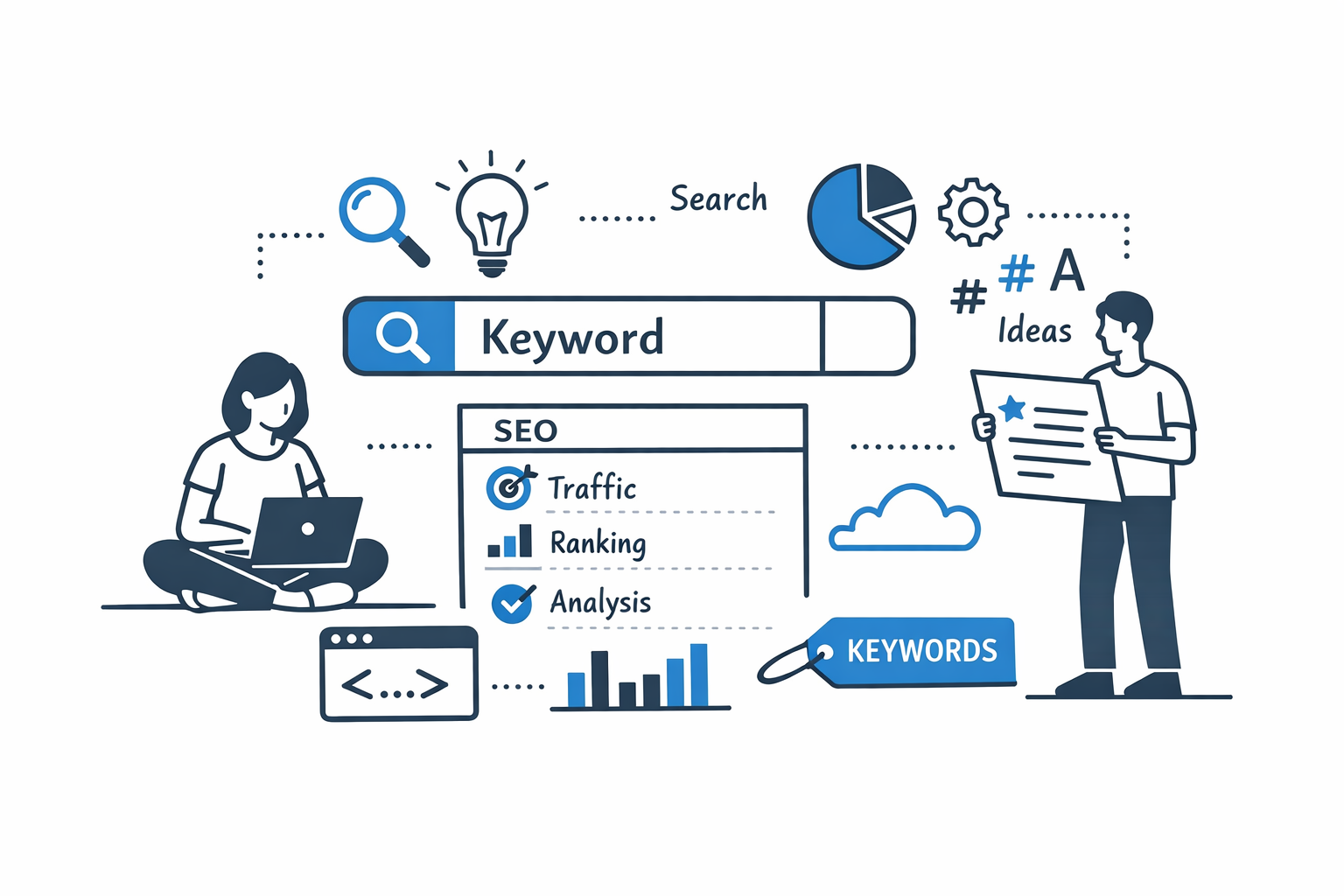
How to choose keywords for a site
Keywords are the foundation of any SEO strategy. They determine what queries users will use to find your site in search engines. Correctly selected keywords help attract targeted visitors, increase conversions and promote your business on the Internet.
In this article, we'll take a closer look at how to choose keywords for your website, even if you're just starting out with SEO.
1. Understanding your site's goals and audience
Before choosing keywords, it is important to clearly understand:
- What products or services you offer.
- Who is your audience. For example, age, geography, interests.
- What actions do you want your visitors to take. This could be a purchase, registration, newsletter subscription, etc.
The more specific you are about these parameters, the easier it will be to find the right keywords.
2. Creating a Primary Word List
Start with a simple brainstorm:
- Write down all the words and phrases that describe your products or services.
- Add synonyms, abbreviations, and popular terms.
- Divide them into categories: products, services, problems, solutions.
Example: for a website selling vitamins, the primary list might include:
- immune vitamins
- natural supplements
- vitamin C buy
- body health
3. Using tools to find keywords
There are many services that can help you expand your list of keywords:
- Google Keyword Planner - a free tool that shows the popularity of queries.
- Yandex. Wordstat – for the Russian-speaking audience.
- Ahrefs, SEMrush, Serpstat – paid services with advanced features.
- Ubersuggest - Free option for keyword ideas.
These tools help you see:
- query frequency,
- competition level,
- similar and additional keys (long-tail and LSI).
4. Selection of long key phrases (long-tail)
Long key phrases consist of 3-5 words and reflect a more specific user request.
Advantages:
- less competition,
- higher probability of conversion,
- more accurate hitting the target audience.
Examples:
- "where to buy vitamin C for children"
- "natural vitamins for immunity in winter"
5. Competitor analysis
Look at what keywords your competitors are promoting for:
- Study their pages, meta tags (title, description), headings.
- Use services like Ahrefs or SEMrush to analyze your competitors' keywords.
This will help you understand which queries work and which don't.
6. Dividing keywords by page
Each page of the site should have its own unique set of keywords:
- Home page - high-frequency keywords that reflect the main theme of the site.
- Product/service categories - mid-frequency keys.
- Blog/articles - long keys and user questions.
This approach helps make the site structured and improves search rankings.
7. Review and adjustment
SEO is a dynamic process. After introducing keywords, you need to:
- Track the site's positions for key queries via Google Search Console or Yandex. Webmaster.
- Adjust the list of keywords: remove irrelevant ones, add new ones, check effectiveness.
8. Tips for effective keyword selection
- Don't try to cram all your keywords onto one page. It is better to distribute them across different pages.
- Try to write natural text rather than just listing keywords.
- Use keywords in headings, subheadings and meta tags.
- Pay attention to user questions - these are great ideas for a blog.
Keyword selection is the first and one of the most important steps in SEO. Correctly selected keywords allow you to attract targeted visitors, increase sales and improve your site’s position in search engines.
Start by analyzing your audience and goals, expand your keyword list with tools, use long tail keywords, analyze competitors, and distribute keywords across pages. A systematic approach will give stable results and improve the visibility of your website on the Internet.
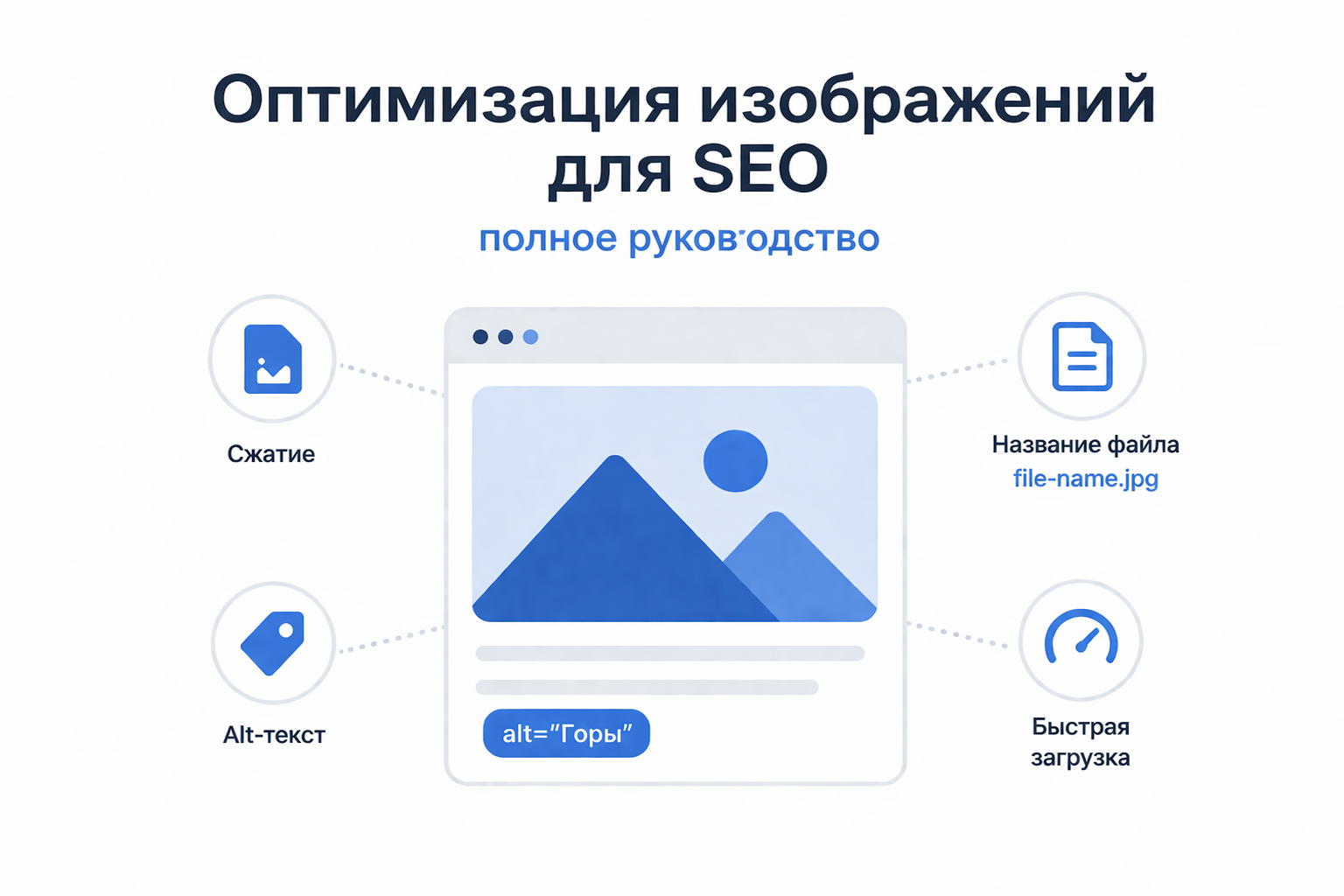
Optimizing Images for SEO: The Complete Guide
Image optimization is an important part of website search engine optimization, which directly affects page loading speed, user experience and search rankings. While text content remains a key ranking factor, properly prepared images can help improve site visibility and drive additional traffic from image searches.
Why image optimization is important
Images can add significant weight to a page, increasing its loading time. Slow websites rank worse and are more likely to be abandoned by users. Additionally, search engines don't "see" images the same way humans do, so they require additional information to understand the content.
Competent optimization helps:
- speed up page loading;
- improve positions in search results;
- increase site accessibility;
- drive traffic from image search.
Basic principles of image optimization
1. Choosing the right format
Different formats are suitable for different purposes:
- JPEG (JPG) - for photographs and images with a lot of color;
- PNG - for images with transparency;
- WebP - modern format with a high compression ratio and good quality;
- SVG - for icons and vector graphics.
Using modern formats such as WebP can significantly reduce file sizes without losing quality.
2. Compressing Images
Images must be compressed before being uploaded to the site. This reduces file size and speeds up page loading.
There are two types of compression:
- Lossy - reduces size at the cost of a slight reduction in quality;
- Lossless - maintains quality but compresses less effective.
The best option is to find a balance between quality and file size.
3. Proper image sizes
Do not upload images larger than required. For example, if an image on a website is displayed at 800x600 pixels, there is no point in uploading a file that is 4000x3000.
It is also recommended to use responsive images so that they display correctly on different devices.
4. alt attribute (alt text)
The alt attribute is a text description of an image that helps search engines understand its content.
Recommendations:
- describe the image briefly and to the point;
- use keywords naturally;
- avoid overspam.
Example:
5. File Names
The file name is also important for SEO. Instead of standard names like IMG1234. jpg use clear and descriptive:
Bad:image1. jpg
Okay:krasiviy-zakat-nad-morem. jpg
Use Latin characters and hyphens to separate words.
6. Using lazy loading
Lazy loading allows images to load only when the user scrolls to them. This reduces the initial page load time.
Example:
7. Image Sitemap
Adding images to an XML sitemap helps search engines find and index them faster. This is especially useful for sites with a lot of visual content.
8. Captions and Context
Text around an image (captions, headings, paragraphs) helps search engines better understand its meaning. Don't post images without context.
Common mistakes
- uploading too large files;
- missing alt attribute;
- using uninformative file names;
- ignoring modern formats;
- duplicating images unnecessarily.
Image optimization is not just a technical task, but an important element of comprehensive SEO. It affects both site performance and its visibility in search engines. Regularly working with images will help improve the user experience and increase organic traffic.
If you want maximum impact, optimize your images from creation to publication.
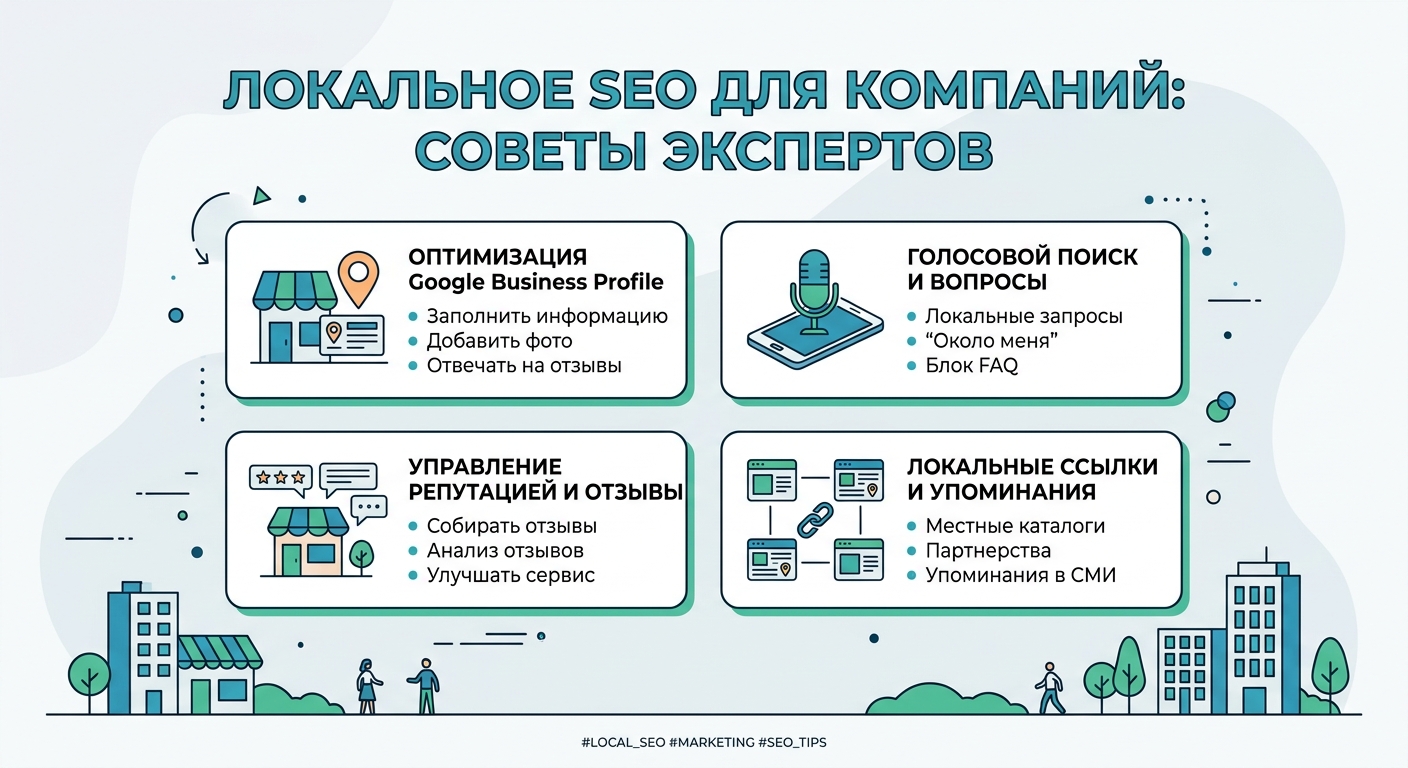
SEO for local companies: expert advice
Local SEO is not just website promotion, but a system that helps a business get customers specifically from their city or region. For companies that operate offline or provide on-site services (construction, installation, salons, restaurants, services), this is one of the most effective channels for attracting customers.
Below is a practical guide with tips that SEO professionals use to truly grow their local business.
1. What is local SEO and why is it important? Moldova"
The main goal is for your business to be shown in Google Maps and local search results when the client is nearby and ready to buy the service.
Why this is important:
- Over 40% of all search queries are local in nature
- A user searching for "nearby" is already ready to buy
- Local SEO competition is lower than in general niches
2. Google Business Profile - the basis of local promotion
The first thing you need to do is set up your Google Business Profile (formerly Google My Business) correctly.
Required elements:
- exact company name
- real address
- telephone
- website
- opening hours
- photos (very important!)
- description of services
Tip expert:
Regularly add photos of works, objects, teams. Google actively promotes active profiles.
3. Optimizing your site for local queries
Your site should “understand” where you work.
What is important:
- indication of the city in the headings (H1, H2)
- separate pages for cities/regions
- mention locations in text
- contact page with map
Example:
❌ Bad: “Installation services panels"
✅ Good: "Installation of solar panels in Chisinau and throughout Moldova"
4. Local Keywords
SEO for local businesses is built around geographic keywords.
Examples:
- apartment renovation Chisinau
- roof installation Moldova
- spa pools buy Chisinau
Tip:
Use combinations:
- service + city
- service + nearby
- service + region
5. Reviews are a powerful ranking factor
Reviews directly impact your Google Maps rankings.
What's important:
- ask customers to leave reviews
- respond to all reviews
- use real ones photo in replies (if possible)
Why it works:
Google trusts businesses with live reviews and activity.
6. Local Link Building
Links from local sites build trust.
Where to get links:
- local company directories
- city portals
- affiliate companies
- local media
7. Content that sells locally
Content is not just articles, but a tool for attracting customers.
Example topics:
- “How much does it cost to install solar panels in Moldova?”
- “How to choose a hot tub for at home"
- "TOP 5 mistakes when repairing a roof"
Tip:
Add geography to your articles - it enhances SEO.
8. Site Structure for Local SEO
Good site structure helps Google understand a business.
Recommended structure:
- Home
- Services
- Individual pages services
- About us
- Contacts
- Blog
9. Behavioral factors
Google analyzes how users behave on the site.
Important:
- fast site
- adapted for mobile devices
- clear “Call” and “Order” buttons
- easy navigation
10. Common mistakes in local SEO
❌ no Google Business Profile
❌ no address on the site
❌ same texts for all cities
❌ lack of reviews
❌ slow website
❌ no mobile version
Local SEO is one of the fastest ways to get clients without large advertising budgets. When configured correctly, a business begins to receive applications directly from Google and Google Maps.
The main principle:
👉 to be as clear as possible for Google and as convenient for the client as possible.
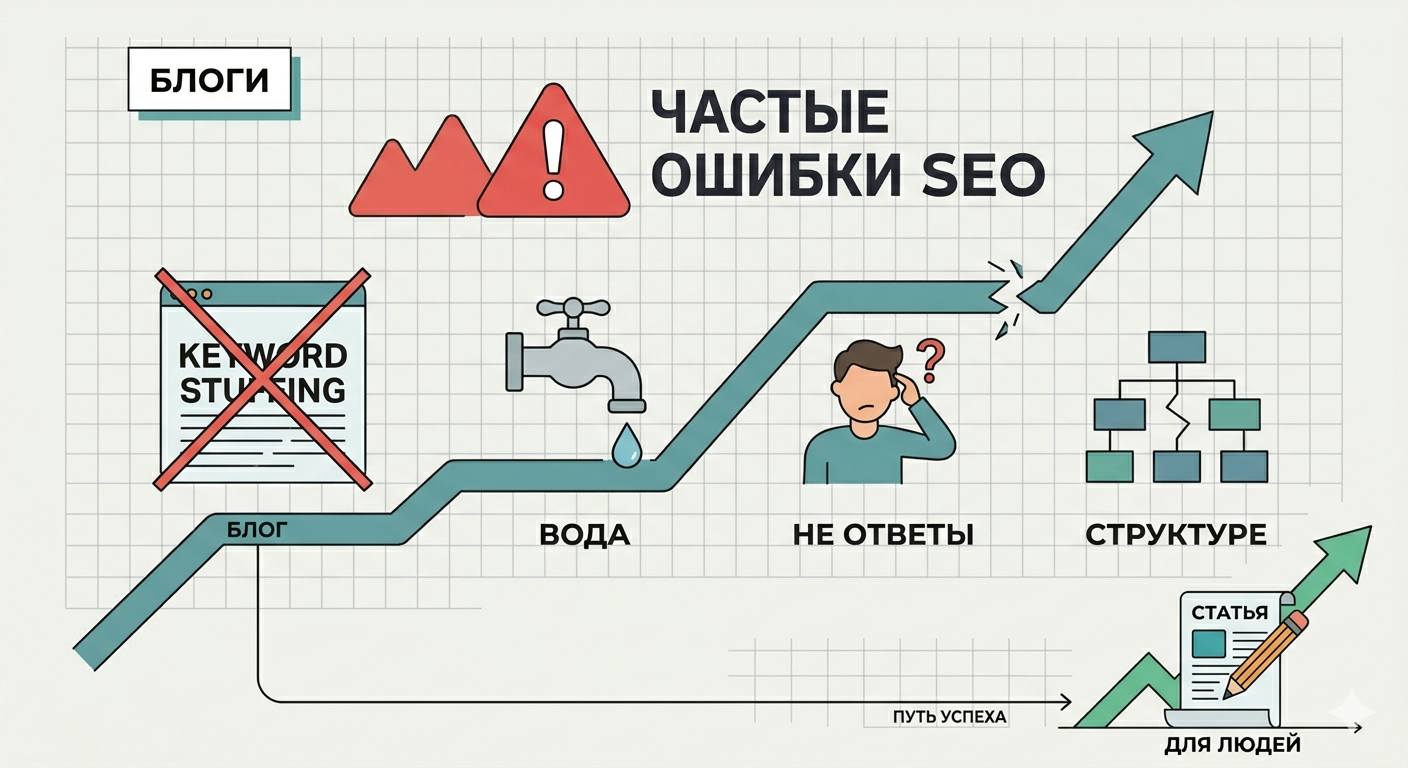
Common mistakes when writing SEO texts
Writing SEO texts in 2026 is not just “stuffing” a page with keywords. Search algorithms have become smarter, they evaluate the benefit to the reader and the naturalness of the language. However, many authors continue to make mistakes that drag the site down.
Here are the main pitfalls to avoid.
1. Keyword Stuffing
This is “hello” from the 2010s. An attempt to insert the phrase “buy plastic windows inexpensively Moscow” into every second sentence makes the text unreadable.
-
How to: Use LSI phrases (synonyms and thematically related words). Primary key density should be moderate (1-3%). The main thing is that the text sounds natural.
2. Ignoring the user's intent
Often authors write a huge longread for the query “how to tie a tie,” although the user needs short instructions with pictures. If the content of the page does not provide a quick answer to the query, the person will leave, and the “behavioral factors” of the site will deteriorate.
-
How to do it correctly: Before writing, analyze the TOP 5 results for your request. See what content format the search engine prefers (article, checklist, video or product card).
3. Lack of structure and hierarchy of headings
The “sheet” text is a failure. Users scan the page with their eyes, and robots use headers <h1>, <h2>, <h3> to understand the structure.
-
Properly:
-
<h1>- only one per page. -
Use lists (bullet and numbered).
-
Break your text into paragraphs of 3-5 lines.
-
4. Unoptimized meta tags (Title and Description)
Even perfect text won't get traffic if no one clicks on it in search. Errors here: lack of keys in the Title or too long, uninformative Description.
-
Correct: The title should contain the main key near the beginning. The description should work like an advertisement: clearly describe the benefit and contain a call to action.
5. Low uniqueness and "water"
Copying other people's thoughts or filling the volume with useless phrases like "in the modern world it's no secret..." reduces the value of the page. Algorithms like Google Helpful Content Update strictly filter out useless content.
-
How to do it: Write expertly. Add facts, figures, personal experiences or cases. If a neural network can write an article in 5 seconds without editing, it means there is too much “water” in it.
6. Forgotten Alt Attributes for Images
Search engines don't “see” images, they read their description. Ignoring the alt tag means losing traffic from image search.
-
How to do it: Describe what is shown in the photo using keywords, but without fanaticism. For example:
alt="office chair assembly diagram".
The main mistake of modern SEO copywriting is writing for robots, forgetting about people. Write for humans, optimize for machines.
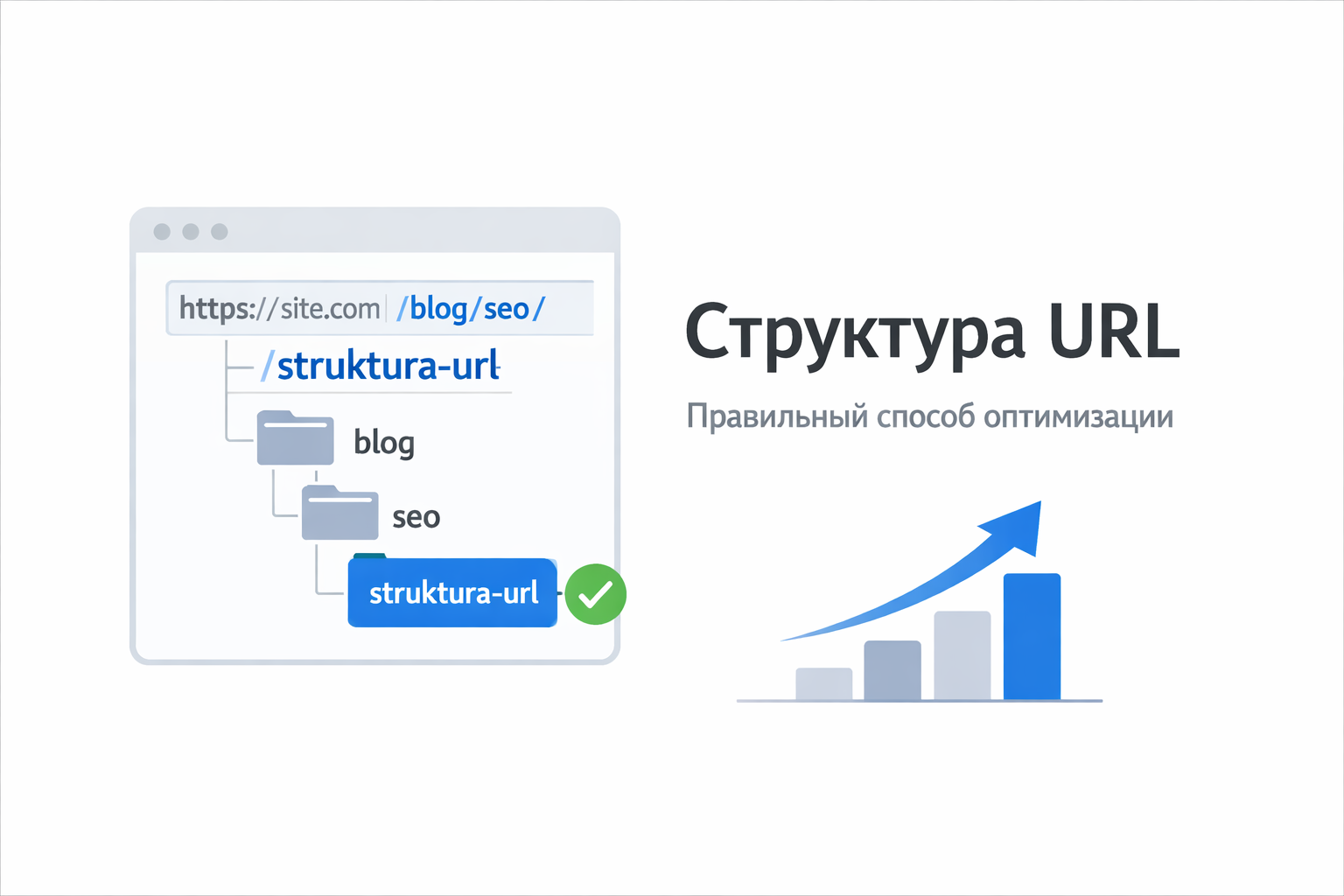
URL Structure: The Right Way to Optimize
URL structure is the format and construction of page addresses on a site. Properly configured URLs help users and search engines better understand the content of the page.
Good link structure is an important part of SEO optimization of website.
What is a URL
URL (Uniform Resource Locator) is the address of a page on the Internet.
Example URL:
This address consists of several parts:
- https:// - connection protocol
- site. com - site domain
- /blog/ - site section
- /seo-optimizaciya - specific page
Why URL Structure Is Important for SEO
Good URLs help search engines understand the topic of a page faster and improve the usability of your site.
Main advantages:
- better page indexing
- increased click-through rate in search
- clear site structure
- convenient navigation for users
What an SEO-friendly URL should look like
A good URL should be:
- short
- clear
- logical
- contain keywords
Example of a good URL:
site. com/seo/struktura-url
Bad example:
In the second case, the address says nothing about the content of the page.
Basic rules of SEO URL optimization
1. Use clear words
The URL should reflect the content of the page.
Example:
It's better than:
2. Use hyphens between words
Search engines read words separated by hyphens better.
Correct:
Wrong:
site. com/seooptimizaciya
3. Keep URLs Short
Short links are easier for users and search engines to understand.
Bad:
Better:
4. Use a logical structure
The URL should show the structure of the site.
Example:
site. com/blog/wordpress
site. com/blog/marketing
This helps search engines understand the hierarchy of pages.
5. Use only lowercase letters
It is better to use only small letters in the URL.
For example:
site. com/seo-optimizaciya
And not:
6. Remove unnecessary parameters
Too many parameters in a URL complicates indexing.
Bad:
Better:
Optimal URL structure for a website
Example correct site structure:
site. com/blog/
site. com/blog/seo/
site. com/blog/seo/struktura-url
Such a structure:
- logical
- clear
- SEO-friendly
URL and WordPress
If the site is made on WordPress, it is important to enable human-readable links.
This can be done in the settings:
Settings → Permalinks
Best structure option:
Then the page address will look like this:
Correct URL structure is an important part of website SEO.
It helps:
- search engines index pages faster
- users understand the content of the link
- improve the site's position in search engines
Therefore, when creating a website, it is important to immediately set up simple, logical and SEO-friendly URLs.
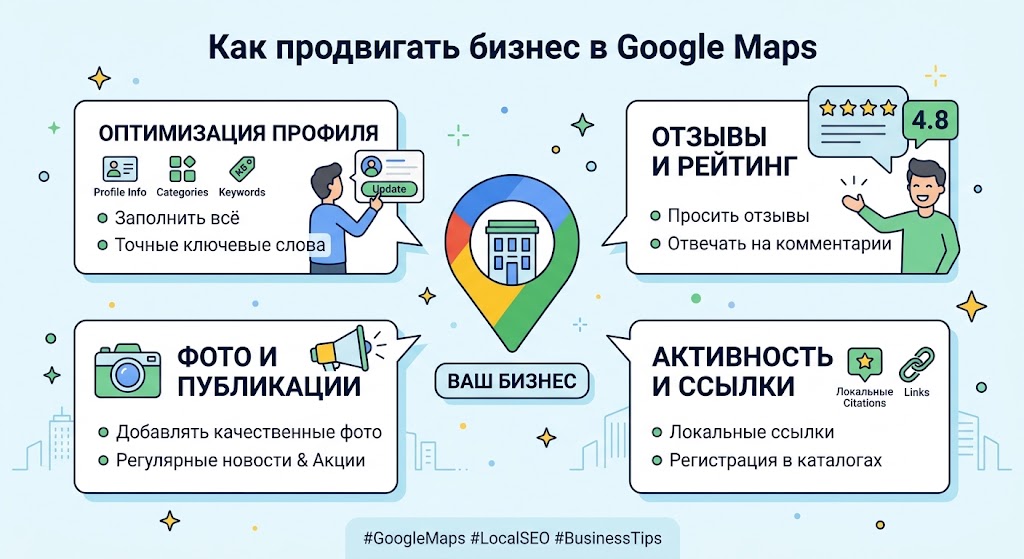
How to promote your business on Google Maps
Promoting your business on Google Maps is one of the most effective ways to attract customers here and now. People who are looking for services through a card are usually already ready to buy: they need a master, a cafe, a store or a service nearby. Therefore, proper profile optimization directly affects the number of calls, applications and visits.
1. Creating and properly setting up a Google Business profile
The first step is to register your company in Google Business Profile. Without this, your business simply will not appear on the map.
It is important to fill out everything as accurately as possible:
- company name (without unnecessary keywords);
- correct business category;
- address or service area;
- phone and website;
- working schedule.
The more accurate the data, the more trust Google and users have.
2. Optimizing description and services
Company description should be more than just a formality. This is a little SEO text that helps Google understand what you do.
A good description includes:
- core service (e.g. repair, delivery, installation);
- geography of work;
- benefits (speed, experience, warranty);
- natural keywords.
The main thing is not to overspam. Google recognizes “artificial” texts well.
3. Working with Reviews
Reviews are one of the key ranking factors in Google Maps.
To improve your rankings:
- ask clients to leave reviews after the service;
- respond to every review (both positive and negative);
- don't ignore criticism - a competent response increases trust.
Businesses with a lot of recent reviews almost always rank higher than their competitors.
4. Photos and Visual Content
Google actively promotes profiles with high-quality images.
Add:
- photo of an office or store;
- work process;
- employees;
- ready results.
Live content increases profile click-through rates and increases conversions.
5. Regular updates
Google loves active businesses. Therefore, it is important to regularly:
- publish news and promotions;
- update photos;
- adjust the schedule during holidays;
- add new services.
An active profile is perceived as more “alive” and rises higher in the search results.
6. Local SEO outside of Google Maps
To enhance the effect, it is important to work not only inside the map, but also outside it:
- add the company to catalogs and directories;
- get links from local sites;
- use geo-keys on the site (for example: “services in Chisinau”);
- embed a map on the site.
This increases the credibility of the business in the eyes of the search engine.
Promotion in Google Maps is not a one-time setup, but an ongoing effort. The better the profile is filled out, the more reviews and activity, the higher you will be in the local search results.
In the end, the winners are those companies that treat their profile as a full-fledged marketing tool, and not just “a card on a card.”
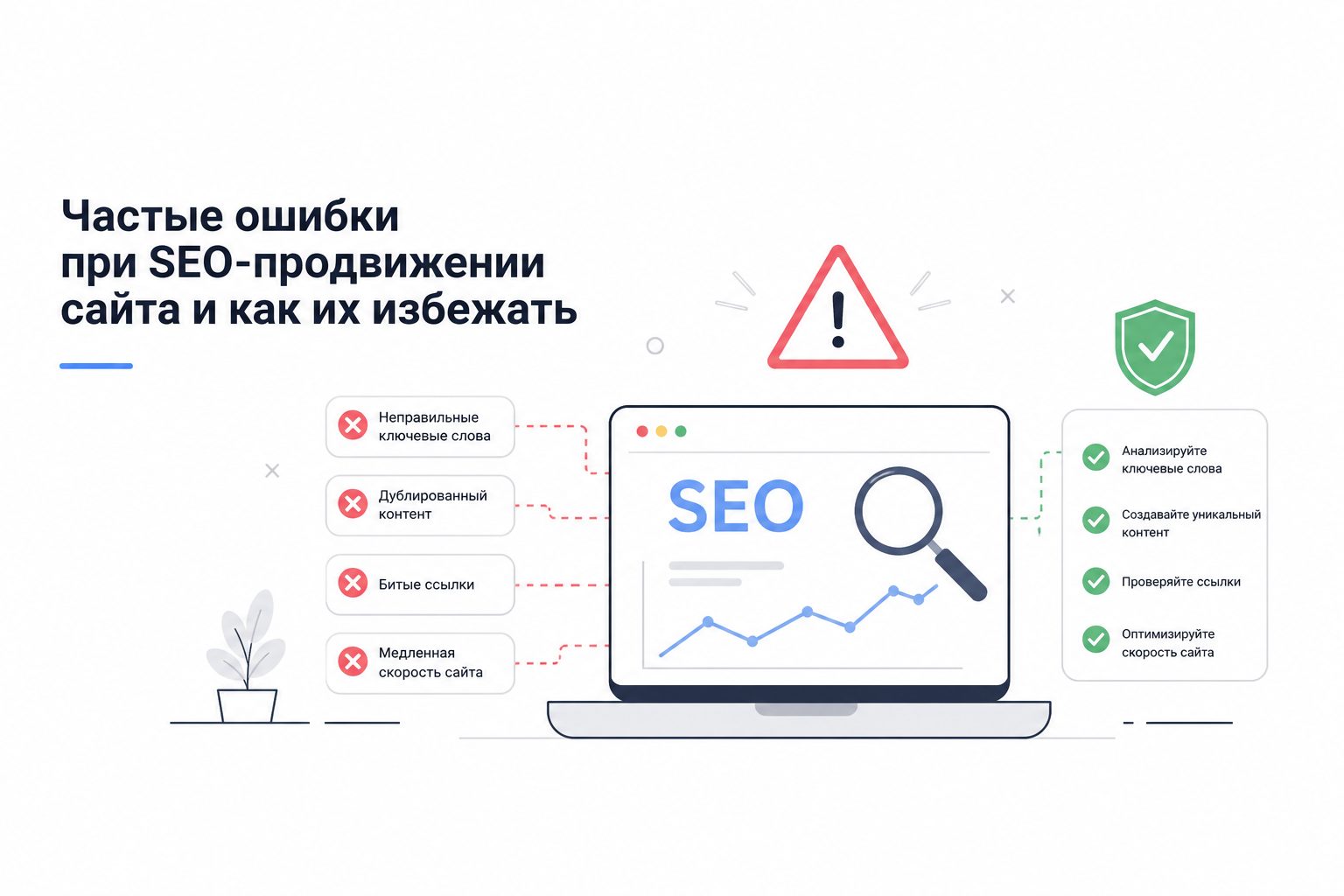
Common mistakes when SEO website promotion and how to avoid them
SEO promotion is one of the most effective ways to attract customers from search engines. However, many website owners make mistakes due to which the site does not reach the TOP of searches. In this article, we will look at common SEO mistakes that hinder website promotion and tell you how to fix them.
1. Lack of an SEO promotion strategy
One of the most common mistakes is to start website promotion without a clear strategy. Many people simply publish articles or add keywords, hoping for quick results.
In fact, SEO is a complex work that includes:
- competitor analysis
- keyword selection
- site structure optimization
- technical SEO
- creating quality content
Without this, SEO website promotion may not yield results.
2. Incorrect selection of keywords
A common mistake is to select only high-frequency queries. For example:
- SEO
- site promotion
- site optimization
There is high competition for such requests, so it will be difficult for a new site to reach the TOP.
It is better to use long key phrases (long-tail):
- order SEO website promotion
- order inexpensive SEO promotion
- SEO website promotion for business
Such queries drive more targeted traffic.
3. Spam with keywords
Some site owners think that if they insert keywords 50 times, the site will quickly reach the TOP.
But search engines easily recognize this and can lower the site in the search results.
Example of bad text:
If you need to order SEO promotion for your website, our SEO promotion will help you order SEO promotion quickly and effectively.
The right approach is to use keywords naturally.
4. Lack of technical SEO optimization
Even good content will not help if the site has technical problems.
Main errors:
- slow site loading
- code errors
- lack of mobile version
- incorrect meta tags
- broken links
Technical SEO is the basis of website promotion.
5. Poor site structure
If a site has chaotic pages, search engines understand its structure less well.
The correct structure includes:
- categories
- subcategories
- internal links
- logical navigation
Good structure helps pages move faster in search.
6. Lack of SEO content
Many sites have only a few pages:
- home
- services
- contact
But for successful SEO, it is important to blog with articles.
For example:
- articles about SEO
- promotion instructions
- error analysis
Each article can drive traffic from Google.
7. Ignoring external links
Links from other sites remain an important ranking factor.
It's a mistake to not deal with links at all.
It is important for SEO:
- receive links from thematic sites
- publish articles
- submit your site to directories
- do crowd marketing
8. Expecting Quick Results
SEO is a long-term strategy.
Many website owners expect results within a week.
In practice, the first SEO results usually appear in:
- 2–3 months
- sometimes 4–6 months
But SEO brings stable free traffic.
SEO promotion is a complex process where it is important to avoid common mistakes.
If you choose the right keywords, optimize your site and regularly publish useful content, your site will gradually begin to grow in search results.
If you want to get results faster, it is better to order SEO promotion from specialists who will audit the site, correct errors and develop a promotion strategy.
Correct SEO promotion helps:
- increase traffic
- attract new clients
- bring your site to TOP Google
- increase sales
Therefore, more and more companies are deciding to order SEO website promotion in order to receive a stable flow of customers from search.
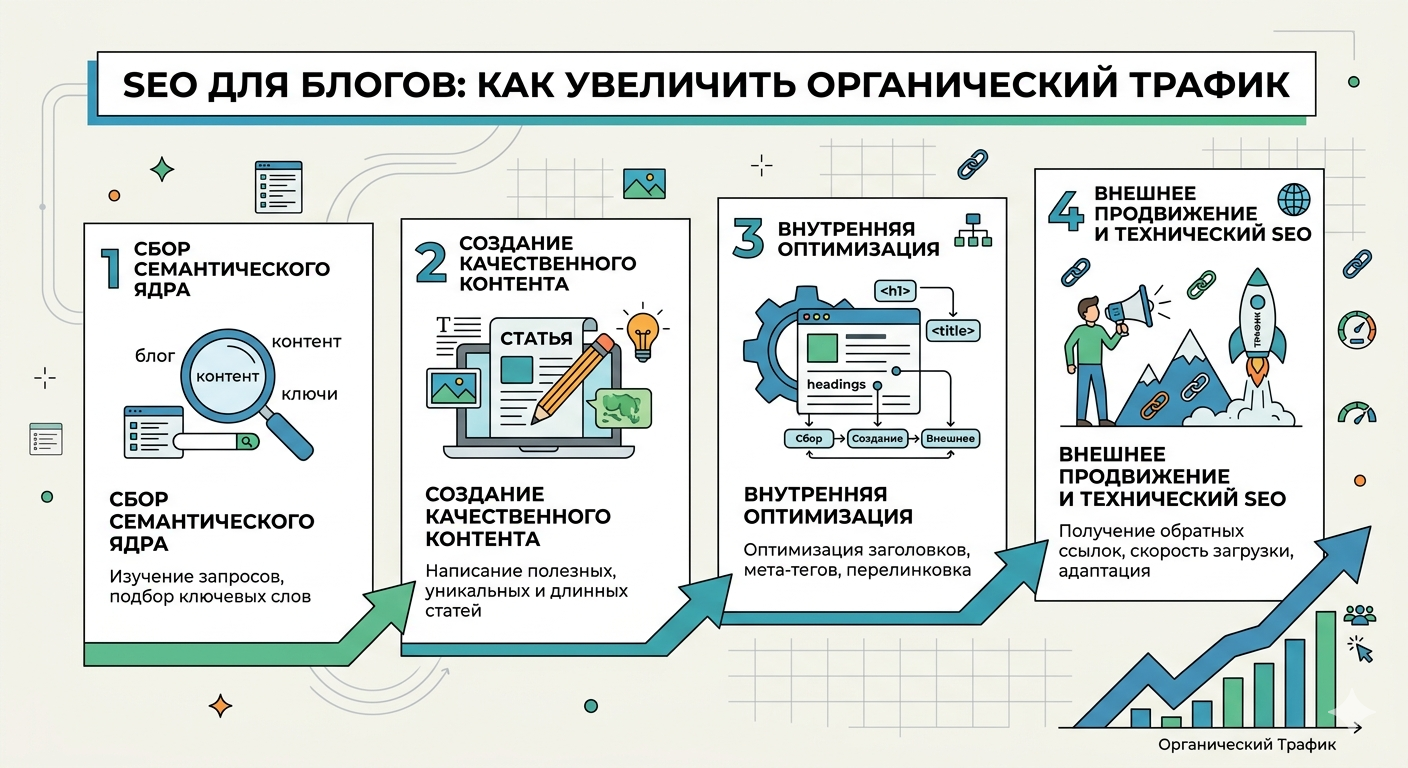
SEO for Blogs: How to Increase Organic Traffic
Organic traffic is one of the main goals of any blogger or website owner. It brings a steady stream of visitors without having to spend money on advertising. To increase organic traffic on your blog, it is important to properly optimize your content and consider the technical aspects of SEO.
1. Conducting Keyword Analysis
Keywords are the basis of any SEO strategy. For blogs, it is important to select words that users are actually looking for, and not just popular terms.
- Use tools: Google Keyword Planner, Ahrefs, Semrush or free options like Ubersuggest.
- Choose low competition keywords: especially for a new blog. Such keywords are easier to rank and can bring stable traffic.
- Build a semantic core: combine main keys with LSI keys (related terms) so that search engines better understand the topic of the article.
2. Content Optimization
Content is what keeps users on your site and keeps them coming back.
- Headings and subheadings: Use H1 for the main heading, H2 and H3 to structure the text. Include keywords.
- Text Quality: Write long, informative articles that answer questions from your audience. Optimal is 1500–2500 words for articles that compete for traffic.
- Internal links: Link articles together to retain visitors and increase time on site.
- Meta tags: title and description should be unique and attract clicks.
3. Technical SEO
Even the best content won't bring in traffic if the site isn't indexed well.
- Loading speed: Optimize images, use caching and CDN. Google takes speed into account when ranking.
- Mobile version: Most users access from mobile devices. Responsive design is a must.
- URL structure: Keep links short, clear, and keyword-rich.
For example:
site. com/seo-dlya-blogov
Sitemap and robots files. txt: Helps search engines index your blog faster.
4. Creating link mass
Links from other sites increase the trust of search engines and improve rankings.
- Guest Articles: Write for other blogs with a link to your content.
- Social Media: Share posts on platforms where your audience is active.
- Internal links: Don't forget about them - they also improve SEO.
5. Analysis and Adjustment
SEO is a process that requires constant analytics.
- Google Analytics and Search Console: Track organic traffic and keyword rankings.
- Content adjustment: if the article is not ranking well, try improving the text, adding new keywords, optimizing headings.
- A/B testing: Test different headline formats, CTAs, and text lengths.
6. Additional Strategies
- Regular Content Update: Search engines love fresh content.
- Image Optimization: Use ALT tags with keywords.
- Video and multimedia: Diversify your content to increase engagement.
To increase organic traffic to your blog, it's important to combine quality content, technical optimization, and linking strategy. SEO is a long-term process, but the right strategy will lead to a steady flow of visitors and increased blog authority.

The main mistakes of newbies in SEO: what to avoid
Search engine optimization of a website is one of the most effective ways to attract customers from the Internet. However, many novice website owners make mistakes due to which promotion does not bring results. In this article, we will analyze the main mistakes of beginners in SEO, so that you can avoid them and understand when it is better to order SEO from specialists.
Search engines such as Google and Yandex are constantly improving their ranking algorithms. Therefore, it is important to properly optimize your site from the very beginning.
1. Lack of keyword analysis
One of the most common mistakes is website promotion without analyzing key queries.
Newbies often write articles on topics that no one searches for. As a result, the site does not receive traffic.
Correct approach:
-
collect a semantic core
-
identify popular search queries
-
use keywords in articles
Examples of key phrases:
-
order SEO
-
order SEO promotion
-
SEO website optimization
-
SEO services
Keyword analysis can be done through the services:
-
Ahrefs
-
SEMrush
-
Serpstat
2. Keyword spamming
Many beginners think that the more keywords in the text, the better.
But search engines have long learned to identify spam. If you use phrases like order SEO too often, your page may lose ranking.
Best approach:
-
write text for people
-
use keywords naturally
-
add synonyms and similar phrases
3. Ignoring Technical SEO
Technical optimization is an important part of website promotion.
Typical problems:
-
slow site loading
-
indexing errors
-
broken links
-
lack of mobile version
To check for technical problems you can use:
-
Google Search Console
-
Screaming Frog SEO Spider
If the site is technically poorly optimized, even good content will not help you reach the top.
4. Poor site structure
Search engines love a logical structure.
Newbie mistake - chaotic placement of pages without categories and structure.
Correct site structure:
-
Home
-
Services
-
Blog
-
Cases
-
Contacts
This helps search engines understand the site's content faster.
5. Lack of quality content
Content is one of the most important factors in SEO.
Common mistakes:
-
copying text from other sites
-
articles that are too short
-
lack of useful information
Search engines, especially Google, value unique and useful content.
A good SEO article should:
-
answer the user's question
-
contain keywords
-
be structured
-
have subheadings and lists
6. No external links
Links remain an important ranking factor.
A newbie mistake is to completely ignore link building.
Ways to get links:
-
blog posts
-
website directories
-
guest articles
-
PR publications
The more quality sites link to yours resource, the higher the trust of search engines.
7. Expecting Quick Results
SEO is a long-term process.
Many newbies think that the site will reach the top in a few days. In practice, promotion can take 3–6 months or more.
If you have no experience, sometimes it’s easier to order SEO promotion so that specialists can build the right promotion strategy.
When to order SEO
If you want:
-
get your site to the top faster
-
get consistent organic traffic
-
beat the competition
better order SEO from specialists.
Professional SEO usually includes:
-
site audit
-
technical optimization
-
creating SEO content
-
working with links
-
competitor analysis
If you avoid these mistakes, your site can gradually grow in search results and receive more and more traffic.
And if you want to achieve results faster, you can order SEO promotion so that professionals can develop a strategy and bring your site to the top of search engines.

How to use LSI keys in text
In modern SEO, it is important not only to use direct keywords, but also to consider LSI keys. They help search engines better understand the content, increase the relevance of pages and improve the site's position in search results. In this article we will look at what LSI keys are and how to use them correctly in text.
1. What are LSI keys
LSI (Latent Semantic Indexing) is a latent semantic index. Simply put, LSI keywords are words and phrases that are semantically related to the main topic of the text, but are not necessarily the same as your direct keyword.
For example, if the main key is “vitamins for immunity”, LSI keys could be:
- “immune system”,
- “body protection”,
- “healthy image” life",
- "disease prevention".
Using LSI keys helps search engines understand the context of the text and reduces keyword spam.
2. Why use LSI keys
The main advantages of LSI keys:
- Increasing text relevance - search engines understand the content of the page better.
- Naturality of the text – the text is not overloaded with repeated keywords.
- Improved SEO rankings – pages with semantically rich text often rank higher in search.
- Attracting the target audience – LSI keys help to reach a variety of user requests.
3. How to find LSI keys
There are several ways:
3. 1 Search suggestions
- Enter the primary key in Google or Yandex.
- Pay attention to the autocomplete suggestions and the "Related Queries" section.
3. 2 Online tools
- LSIGraph, UberSuggest, Ahrefs - help you find semantically related words.
3. 3 Competitor Analysis
- See what words and phrases are used by sites that rank in the top positions for your keyword.
4. How to correctly use LSI keys in text
4. 1 Natural inclusion in content
- LSI keys should fit seamlessly into sentences.
- Do not try to insert them artificially - this may impair the readability of the text.
Example:
- Main key: “vitamins for immunity”
- LSI key: “healthy image” life"
- In the text: "To maintain immunity, it is important not only to take vitamins, but also to lead a healthy lifestyle."
4. 2 Use in Headings and Subheadings
- Include LSI keys in H2, H3, lists and subheadings.
- This helps search engines quickly understand the structure and topic of the page.
4. 3 Distribution throughout the text
- Place LSI keys evenly throughout the text, especially at the beginning and middle of the article.
- Do not overload the text with a large number of LSI keys - 3-5 natural phrases per 500-1000 words are enough.
5. Tips for using LSI keys
- Write for people, not search engines. LSI keys should improve text comprehension.
- Use variety: synonyms, words that are close in meaning, phrases.
- Update content regularly, adding new LSI keys as audience requests change.
- Check your text through SEO tools to make sure LSI keys are included naturally.
LSI keys are an important tool in modern SEO. They help create content that is understandable to both users and search engines. Correct use of LSI keys increases the relevance of the text, improves the site's ranking in search results and makes the content more natural and useful for readers.
Use LSI keywords organically, distribute them throughout your text, and include them in headers to help your site rank effectively and consistently.

Optimizing headings and subheadings for SEO
Headings and subheadings play an important role in the SEO optimization of an article. They help search engines understand the structure of a page and help readers find the information they need faster.
1. Use the correct heading structure
In SEO there is a hierarchy of headings:
-
H1 - main page heading (used once)
-
H2 - main sections of the article
-
H3–H4 - subheadings within sections
This structure helps search engines better analyze the content of the page.
2. Add Keywords
It is advisable to include keywords in headings. This increases the page's relevance to the search query.
Example:
Bad: How to write texts
Better: How to write SEO texts for a website
But it is important to use keywords naturally and not overload them headers.
3. Make headings clear
A good heading should:
-
clearly reflect the content of the section
-
be short and understandable
-
attract the reader's attention
If the user immediately understands what a section is about, they stay on the page longer.
4. Break the text into blocks
Large texts without subheadings are less readable. Using H2 and H3 makes the article easier to read.
Benefits:
-
improved readability
-
increased time on page
-
better indexing by search engines
5. Use questions in subheadings
Search engines often show answers to questions in search results. Therefore, it is useful to use subheadings in question format.
For example:
-
What is an SEO title?
-
How to use H1 and H2 correctly?
Proper optimization of headings and subheadings helps improve the structure of the article, increase its readability and increase the page's chances of getting to the TOP of search results. Well-designed H1, H2 and H3 are an important part of successful SEO content.
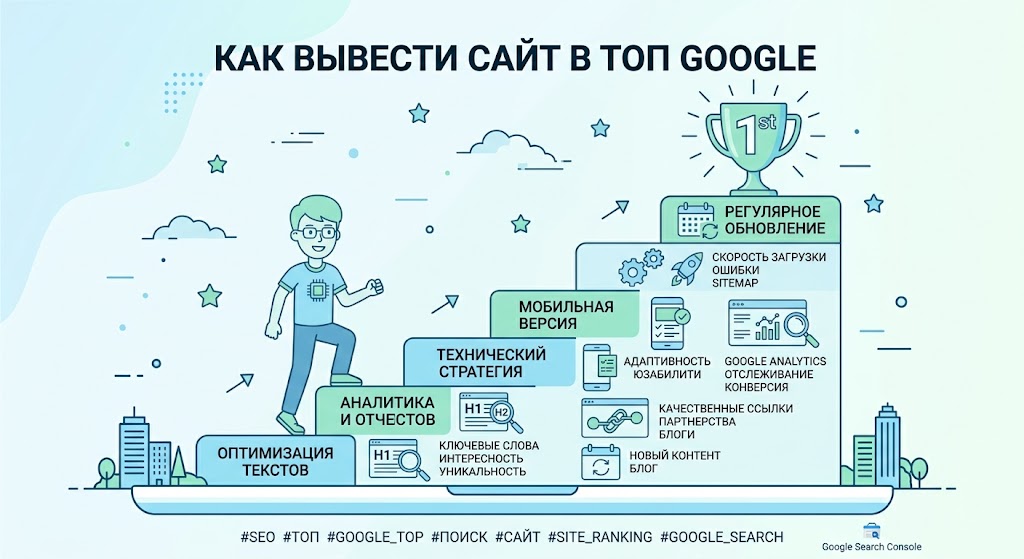
How to bring your website to the top of Google
Promoting a website on Google requires a comprehensive SEO approach: technical optimization, quality content, correct page structure and obtaining authoritative external links. In this article, we will look at the main ranking factors and practical steps that will help improve your website’s position and attract more organic traffic.
Step-by-Step Guide
1. Choose the Right Keywords
First, you need to understand what people are searching for on Google.
Examples:
- create a website
- order a website
- website templates
- WordPress themes
- how to make a website
Use tools:
- Google Keyword Planner
- Ahrefs
- Ubersuggest
It is better to take low-frequency queries (they are easier to bring to the top).
Example:
❌ website creation
✅ how to create a website on WordPress for free
2. Write an SEO Article
Google loves detailed and useful articles.
Good article structure:
- Heading (H1)
- Introduction
- Subheadings (H2 / H3)
- Lists
- Pictures
- Answers to questions
Optimal article length:
2000 – 4000 words
3. Do proper SEO optimization
Add keywords:
- in Title
- in H1
- in URL
- in description (meta description)
Example URL:
site. com/kak-sozdat-sait
4. Optimize site speed
Google loves fast sites.
Test your speed with
Google PageSpeed Insights
What speeds up your site:
- image compression
- fast hosting
- caching
- CDN
5. Make internal links
Link articles together.
Example:
- article Create a website
- article WordPress Themes
- article SEO for the site
This helps Google better understand the structure of the site.
6. Get external links
Links from other sites = strong signal to Google.
Where to get them:
- guest articles
- website directories
- forums
- blogs
7. Add your site to Google services
Be sure to connect:
- Google Search Console
- Google Analytics
This will help:
- see errors
- understand which pages are receiving traffic
8. Publish articles regularly
Google loves live sites.
Best chart:
- 2-3 articles per week
- minimum 50-100 articles on site
How long you need
Usually:
- 1-2 months - first positions
- 3-6 months - stable traffic
- 6-12 months - high traffic
Interesting fact:
80% of SEO traffic comes from 20% of articles.