Installation on Ubuntu (LinuxMint)
sudo apt install berusky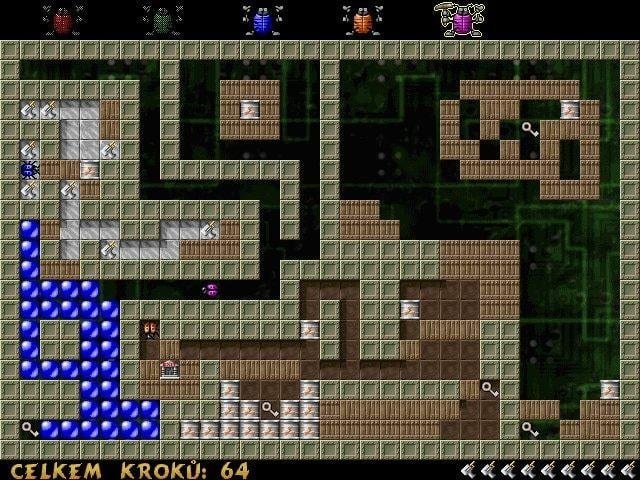
 admin
admin
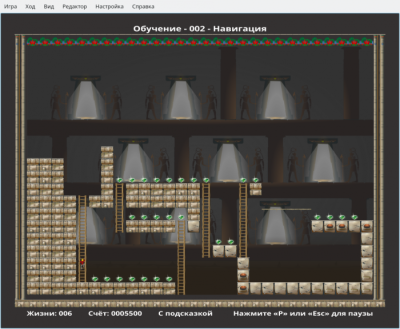
Berusky I is a 2D logic game where you have to move blocks and get keys.
Berusky was inspired by the puzzle game Sokoban, in which the player had to move boxes in a maze. Berusky adds new elements and objects to the gameplay - explosives, stones, gates and others.
The game has about 120 levels.
The goal of each level is to collect 5 keys and reach the exit. The player controls five bugs and can freely switch between them.
To complete the level, you need to collect all 5 keys. To do this, the player must interact with the surrounding blocks. There are blocks that need to be moved, and also blocks that need to be blown up. There are rocks that can be broken using a hammer or a weapon.
To advance to the next level, the player must ensure a clear path to the gate. Gates come in different types. There is a gate that can only be opened with a key of the corresponding color. There are gates that close (and never open again) the first time you pass through them.
The game has a built-in level editor, with which you can create your own maps and mazes.
To start the level editor, run in the command line:
berusky -eWorking with the editor is very simple. All actions are performed with the mouse. The user selects map objects and places them on the playing field.
Press the F1 key to get a list of hotkeys that you can use. Some useful keys:
F2 - save level.
Ctrl+F2 - save level as (set file name).
F3 - load level for editing.
F9 - start level.
To run a custom level, use the command:
berusky -u levelname.lv3The Berusky game is available in the standard repositories of popular Linux distributions.
Package name: berusky
For example, on Ubuntu Linux the game can be installed by running the command:
sudo apt install beruskysudo apt install beruskyLeave your contact details, and we will contact you to complete your order.