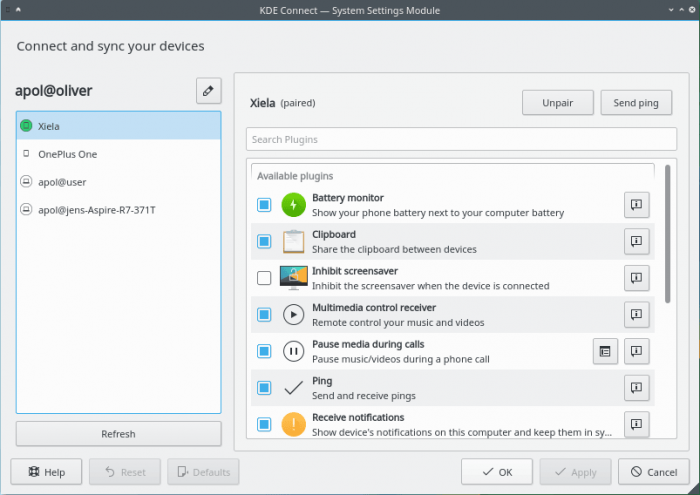
KDE Connect is a program that allows you to organize interaction between a PC and a smartphone. It supports displaying notifications, sharing files, managing music, sending messages, and so on.
To use KDE Connect, you need to install the desktop version of the program (Linux, Windows or Mac OS), as well as the program on your mobile device (versions available for Android and iOS). To connect, devices must be connected to the same local network.
KDE Connect runs in the KDE Plasma environment.
Features:
- Connect and interact with multiple devices.
- Receive notifications from your phone and display them on your desktop.
- Call notifications.
- Control music played on your computer from your phone.
- Using your phone as a remote control for your computer.
- Remote command execution. Run various preset commands on your PC by pressing buttons on your phone. For example, you can set commands to turn off and restart the computer, lock or go into sleep mode, change the theme, change the brightness, take screenshots, and so on.
- Checking your phone's battery level.
- Share files between devices.
- Exchange links between devices.
- Shared clipboard.
- View files on your phone (using SFTP).
- Control computer volume from your phone.
- Flip through presentation slides from your phone.
- Synchronizes contacts between your computer and a connected device.
- Sending SMS messages from your computer.
- Search for a phone using a sound signal.
Installation on Ubuntu (LinuxMint)
sudo apt install kdeconnect
Installation in ArchLinux (Manjaro)
sudo pacman -S kdeconnect
Installation on Fedora
sudo dnf install kde-connect
Installation in openSuse
sudo zypper install kdeconnect
Installation in Gentoo
sudo emerge -a kde-misc/kdeconnect


 admin
admin