Cart Sign In
DEVNEW.ORG — Digital Tools & Data » Статьи » SEO » Technical SEO » Структура URL: правильный способ оптимизации
Структура URL: правильный способ оптимизации
admin
26-03-2026, 19:57 63 0

Структура URL: правильный способ оптимизации

Структура URL — это формат и построение адресов страниц на сайте. Правильно настроенные URL помогают пользователям и поисковым системам лучше понимать содержание страницы.

Грамотная структура ссылок является важной частью SEO-оптимизации сайта.

Что такое URL

URL (Uniform Resource Locator) — это адрес страницы в интернете.

Пример URL:


Этот адрес состоит из нескольких частей:

  • https:// — протокол соединения
  • site.com — домен сайта
  • /blog/ — раздел сайта
  • /seo-optimizaciya — конкретная страница

Почему структура URL важна для SEO

Правильные URL помогают поисковым системам быстрее понимать тему страницы и улучшают удобство сайта.

Основные преимущества:

  • лучшая индексация страниц
  • повышение кликабельности в поиске
  • понятная структура сайта
  • удобная навигация для пользователей

Как должен выглядеть SEO-дружественный URL

Хороший URL должен быть:

  • коротким
  • понятным
  • логичным
  • содержать ключевые слова

Пример хорошего URL:

site.com/seo/struktura-url


Плохой пример:

site.com/page?id=12345&category=9


Во втором случае адрес ничего не говорит о содержании страницы.

Основные правила SEO-оптимизации URL

1. Используйте понятные слова

URL должен отражать содержание страницы.

Пример:

site.com/sozdanie-saita


Это лучше, чем:

site.com/page-27


2. Используйте дефисы между словами

Поисковые системы лучше читают слова, разделенные дефисами.

Правильно:

site.com/seo-optimizaciya


Неправильно:

site.com/seo_optimizaciya
site.com/seooptimizaciya


3. Делайте URL короткими

Короткие ссылки легче воспринимаются пользователями и поисковыми системами.

Плохо:

site.com/blog/category/seo/2026/03/26/seo-optimizaciya-dlya-nachinayushih


Лучше:

site.com/seo-optimizaciya


4. Используйте логическую структуру

URL должен показывать структуру сайта.

Пример:

site.com/blog/seo
site.com/blog/wordpress
site.com/blog/marketing


Это помогает поисковым системам понять иерархию страниц.

5. Используйте только строчные буквы

Лучше использовать только маленькие буквы в URL.

Например:

site.com/seo-optimizaciya


А не:

site.com/SEO-Optimizaciya


6. Удаляйте лишние параметры

Слишком много параметров в URL усложняет индексацию.

Плохо:

site.com/product?id=4589&color=black&size=xl


Лучше:

site.com/product/nike-air-max


Оптимальная структура URL для сайта

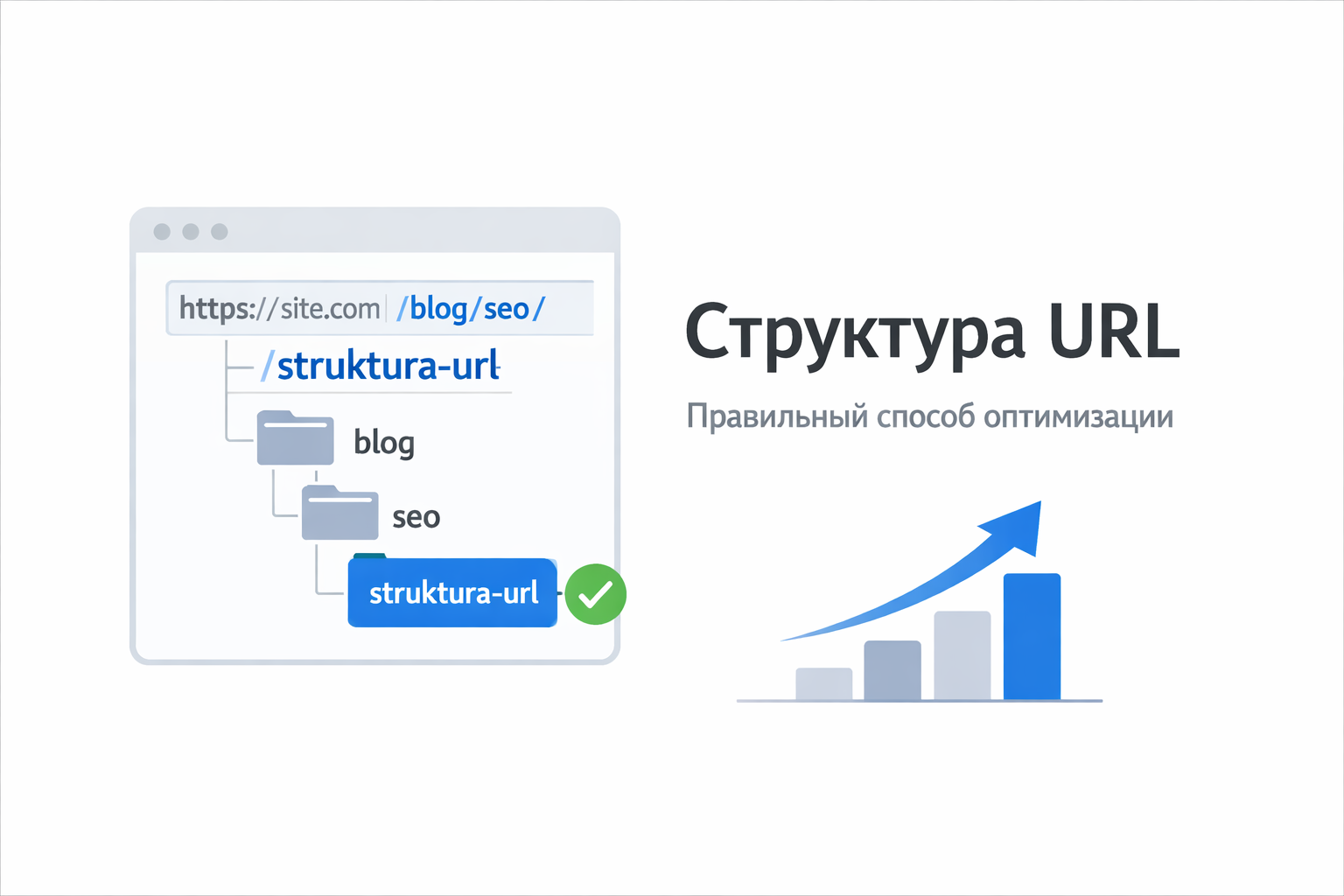
Пример правильной структуры сайта:

site.com/
site.com/blog/
site.com/blog/seo/
site.com/blog/seo/struktura-url


Такая структура:

  • логичная
  • понятная
  • удобная для SEO

URL и WordPress

Если сайт сделан на WordPress, важно включить человеко-понятные ссылки.

Это можно сделать в настройках:

Настройки → Постоянные ссылки

Лучший вариант структуры:

/%postname%/


Тогда адрес страницы будет выглядеть так:

site.com/struktura-url


Правильная структура URL — важная часть SEO-оптимизации сайта.

Она помогает:

  • поисковым системам быстрее индексировать страницы
  • пользователям понимать содержание ссылки
  • улучшать позиции сайта в поисковой выдаче

Поэтому при создании сайта важно сразу настроить простые, логичные и SEO-дружественные URL.

See Also

Clean website code is correctly structured, optimized, and understandable HTML, CSS, and JavaScript code. Such code is easily readable by developers and is processed without problems by search engine bots. The quality of the code directly affects website speed, indexing, and SEO positions. What is clean code Clean code is code that: has a correct HTML structure does not contain unnecessary elements loads quickly is easy to read and maintain complies with web development standards The simpler and neater the website code, the easier it is for search engines to analyze pages. Why clean code is important for SEO 1. Improves website loading speed If the code has many unnecessary scripts, styles, or unused elements, the page loads slower. A slow website: ranks worse loses visitors faster worsens behavioral factors Clean code helps speed up page loading. 2. Simplifies website indexing Search engine bots analyze the HTML code of the page. If the code: is logically structured contains correct
What is sitemap.xml Sitemap.xml is a special file on a website that lists all important pages of your resource. It helps search engines find and index pages faster. The file is created in XML format and is usually located at: Search engines like Google and Yandex use this file as a site map. Thanks to it, search bots understand the site structure and find new pages faster. Why is sitemap.xml needed 1. Speeds up site indexing When a new page appears on the site, a search bot may not find it immediately. Sitemap informs the search engine that the page exists and needs to be indexed. This is especially important for: new websites large online stores websites with a large number of pages 2. Helps search bots understand the site structure In sitemap, you can specify: which pages are most important when the page was updated how often it changes This helps search engines navigate the site better. 3. Improves SEO Having a sitemap.xml does not guarantee high rankings, but it helps to: index
The robots.txt file is one of the basic tools of technical SEO. It helps control which pages of the site search bots, including Google, can crawl. Properly configuring robots.txt can speed up indexing, avoid duplicates, and protect service sections of the site. What is robots.txt robots.txt is a text file placed in the root of the site: It contains instructions for search engines like Google Search. Basic robots.txt directives 1. User-agent Specifies which bot the rule applies to: User-agent: * * means all search bots. 2. Disallow Prohibits access to specific pages or sections: Disallow: /admin/ Disallow: /cart/ 3. Allow Allows access to specific pages: Allow: /blog/ 4. Sitemap Specifies the path to the sitemap: Sitemap: Example of a correct robots.txt User-agent: * Disallow: /admin/ Disallow: /checkout/ Allow: / Sitemap: 📌 This means: admin panel and checkout are blocked other pages are open for indexing Common mistakes 1. Complete indexing ban Disallow: / ❌ Blocks the entire site
Today, over 70% of users access websites from smartphones. That's why Google has adopted the Mobile-First Indexing principle — meaning the mobile version of a website is primarily evaluated. If a site performs poorly on phones, it loses search rankings and customers. What is Mobile Optimization Mobile optimization is the process of configuring a website for correct display and fast performance on smartphones and tablets. Responsive design is an approach where a website automatically adjusts to screen size. Why is it Important for SEO Google considers: mobile usability loading speed text readability correct display of elements If a site is not optimized, it receives a lower ranking. Common Mobile Version Mistakes 1. Site not adapted to the screen Users have to zoom in on the page. 📌 Solution: use responsive layout (responsive design) 2. Text too small Text is difficult to read without zooming. 📌 Solution: font size from 16px sufficient spacing 3. Buttons too small Users cannot tap
A website technical audit is the foundation of effective SEO promotion. Even the most beautiful and sales-oriented website won't bring in clients if it has technical errors. Regular checks help identify problems and improve search engine rankings. 1. Website Loading Speed Fast loading is one of the key ranking factors. If a site takes longer than 2-3 seconds to load, users leave, and rankings drop. It's important to optimize images, code, and the server. 2. Mobile Responsiveness Most users access websites from their phones. The site must display correctly on all devices and work quickly on mobile. 3. Page Indexing Check if all important pages are being indexed by search engines. Errors in the robots.txt file or meta tags can block the site from Google. 4. Errors and Broken Links The presence of 404 pages and non-working links degrades user experience and negatively impacts SEO. They need to be found and fixed regularly. 5. Website Structure and URLs A clear structure and
What is a Canonical URL Canonical URL is a special tag that tells search engines which version of a page is the primary one if there are multiple pages with identical or very similar content on a website. It is used to combat duplicate content, which can negatively affect SEO. Canonical is specified in the HTML code of the page and looks like this: This tag tells search engines like Google and Yandex that this specific URL should be considered the main one. Why is a Canonical URL needed 1. Solves the problem of duplicate pages Identical pages with different URLs may appear on the site. For example: A search engine might consider them different pages. Canonical indicates that the main page is one. 2. Transfers SEO weight to the main page If multiple pages have the same content, links can be distributed among them. Canonical helps transfer all SEO weight to one page, which improves its ranking. 3. Aids in correct indexing Search engines understand: which page to index which pages to

Reviews (0)

reload, if the code cannot be seen


Quick Purchase

Leave your contact details, and we will contact you to complete your order.